This guide is for UK electricians who are qualified and ready to trade but have little or no online presence. It covers online setup and local marketing. It does not cover becoming qualified, electrical safety procedures, business registration, tax or the full requirements for operating an electrical business.
You do not need reviews, a large website or a paid SEO tool to start. You do need honest information, control of your accounts and a reliable way to respond to customers. Getting these foundations working is the first outcome. Rankings and enquiries are not guaranteed.
Our running example
Alex Rowan and Rowan Electrical are entirely fictional. In our exercise, Alex is a qualified electrician starting a new business from a private home base near York. Customers do not visit that address. Alex offers planned domestic lighting work and socket additions in York, Haxby and Wigginton, subject to assessing each job. The business has no reviews or completed customer case studies yet. It does not offer a 24-hour emergency service.
Alex’s example contact hours are Monday to Friday, 8am–5pm. Those are a fictional operating choice, not a recommended schedule. Alex checks messages between appointments and at the end of the working day. Use your real services, capacity, qualifications and response arrangements in place of this example.
1. Choose your work and coverage
Before picking keywords, write down the work you can actually accept. A website that attracts unsuitable jobs creates extra administration rather than useful growth.
Complete worksheet 1 with your services, customer types, areas and limits. For each service, answer: can we deliver it, do we want it, and can we explain what happens next?
Alex’s starting list is deliberately small:
| Decision | Fictional example |
|---|---|
| Customer | Homeowners planning electrical improvements |
| Work | Lighting changes and additional sockets, assessed before agreement |
| Coverage | York, Haxby and Wigginton |
| Limits | No advertised emergency response; no jobs outside current competence or capacity |
| Next step | Customer describes the job and postcode; Alex checks suitability and arranges the next conversation |
Coverage is a working business decision. Think about travel, parking, job size and time between appointments. Listing every nearby county makes little sense if you cannot serve the resulting enquiries.
Done when someone else can read your list and identify the jobs and locations you will accept.
2. Own your accounts and business details
Keep a single reference for your trading name, business phone, email, website address, public coverage and contact arrangements. Distinguish your private administrative details from information intended for customers. A hidden Google home address does not determine your separate legal disclosure obligations elsewhere.
Choose a domain your business controls. Understand who is the registrant, who can renew it, who controls the domain settings and what happens if you leave your website supplier. Record renewal dates and charges before agreeing to a service.
Create an account register for the domain, email, website, Google Business Profile and Search Console. Search Console is Google’s tool for investigating how your website appears in search. Keep ownership and recovery access with the business. Give suppliers their own appropriate access rather than sharing one password. Enable multi-factor authentication where available.
Your register should say where access is managed, not contain passwords or security codes. Keep recovery instructions in a suitable private system. Test that the business owner can sign in independently of a supplier.
Done when you can access and recover each essential account, and you know who pays for renewals.
3. Understand local search
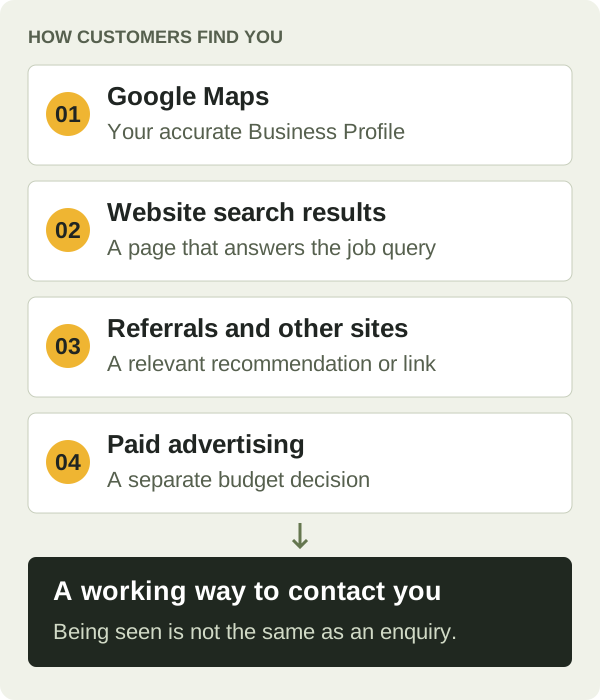
Customers may find an electrician through several routes:
| Route | What it does | Your first task |
|---|---|---|
| Google Maps and local results | Shows business profiles relevant to a local search | Set up an accurate, eligible Business Profile |
| Website search results | Takes a customer to a page that answers their query | Publish useful service and contact information |
| Paid advertising | Buys advertising exposure under the platform’s rules | Treat as a separate budget and measurement decision |
| Referrals and other websites | Introduces people to your business | Give contacts a working website and contact route |
Google describes local results in terms of relevance, distance and prominence. You cannot buy a better organic local ranking. An accurate profile helps Google understand the business, but does not remove distance or competition. Google’s local ranking guidance.
A service-area setting describes where you work. It is not a promise of visibility across that area. Your first useful milestone is a working online presence that you can share, even while search visibility develops.
4. Find or create your Google Business Profile
Start by searching Google and Maps for your business name, current and previous phone numbers, and any previous trading name. Keep the matching profile link in worksheet 3.
Choose the correct access route
| What you find | Next action |
|---|---|
| Your business, already under your account | Use that profile and review its information |
| Your business, unclaimed | Follow Google’s claim and verification route |
| Your business, managed by someone else | Follow Google’s ownership guidance; do not create a replacement duplicate |
| An inaccessible service-area profile | Use the service-area ownership support route described by Google |
| No matching profile | Check eligibility, then create the appropriate profile |
| A suspension or disabled profile | Resolve the issue through the relevant Google support/appeal route rather than starting another profile |
Ownership steps vary by profile type. In particular, Google directs service-area ownership requests to support. Read the route that matches your situation. Google’s ownership instructions.
Represent the business honestly
Use your real business name, without adding search phrases unless they are genuinely part of that name. Choose a main category that describes the business and only relevant additional categories. Add the services you actually provide, a controlled phone number and accurate hours.
An electrician who travels to customers can be eligible as a service-area business. If customers do not visit your home base, hide that address on the profile. Do not substitute a virtual office to appear based in another town. A customer-facing location has different requirements. Google’s business representation rules.
For the fictional Alex, the profile uses Rowan Electrical, the appropriate electrician category available in the interface, the real private base for required verification and a hidden public address. York, Haxby and Wigginton are the working coverage choices. Google specifies service areas using supported places such as towns or postcodes, rather than a radius. Google’s service-area instructions.
Complete the offered verification process
Google determines which verification methods are available. Follow the method actually shown in your account, and prepare the evidence its instructions request. Do not assume you can choose a postcard, phone call or video method, or promise yourself a completion date. Keep verification evidence private and submit it only through the appropriate Google route. Google’s verification guidance.
Record your current status, action date and next legitimate step. Alex’s example status is verification pending, not “live on Maps”. A saved profile is not proof that customers can see it.
While access or verification is pending, finish your website, test contact routes, organise your own photos and check existing eligible listings. Tell existing professional contacts how to reach the business and participate in relevant local communities under their rules. These actions keep the setup moving; they do not guarantee immediate work.
Once the website is live, add its correct address to the profile. Check the public phone, website link, hours and coverage rather than relying solely on the management screen.
Done when the correct profile is under the right ownership, or its unresolved access/verification step has an owner and next action. Record public visibility separately.
5. Build a small website that answers customer questions
Your customers search for electrical work. You, as the business owner, may search for website or SEO help. Keep those two audiences separate when writing your own site.
Start with the customer’s task: “I need extra sockets in my York home.” Look at relevant local search results and note the language customers encounter. Do not copy competitors’ text or claim search volume from an autocomplete suggestion. For deeper research, use our keyword and page-planning guide.
Give each page a clear job
| First page | Question it answers |
|---|---|
| Home | What do you do, where do you work and why should I contact you? |
| Services | Can you help with my type of job? |
| Substantial individual service page, when useful | What does this specific service involve and what happens next? |
| About | Who will do the work and what can you substantiate about their experience? |
| Contact | How do I enquire, and when should I expect a response? |
| Privacy and applicable business information | How are my details handled and who am I dealing with? |
A small initial site can explain related services together. Create a separate service page when it needs its own useful explanation, rather than to repeat a slight keyword variation.
Alex’s fictional map groups “extra sockets York” and “socket installation York” on one relevant page. It does not create two near-identical pages for those phrases. That page links from the services section and offers a next step to contact Alex.
Write a service page someone can use
Here is a short fictional teaching draft, not copy ready for your business:
Additional sockets for homes in York and nearby areas
Rowan Electrical helps homeowners planning additional sockets in York, Haxby and Wigginton. Tell Alex which room you are changing and what you want to use it for. The existing installation and proposed work need assessing before the scope and price are agreed.
What happens next
Send your postcode and a short description. Alex will check whether the work is within the business’s coverage and arrange a conversation or visit as appropriate. You will receive the proposed scope and price before agreeing to proceed.
Who you will deal with
Alex is the electrician running this new business. There are no customer reviews or published job stories yet. Ask about the qualifications relevant to your work before booking.
Request a quote
Use the enquiry form with your preferred contact method. Messages are checked between appointments and at the end of the working day, Monday to Friday. This is a planned-work service, not a 24-hour emergency response.
The opening identifies the job and area. The middle explains assessment and next steps without inventing a fixed price. The proof section avoids pretending a new company has a customer history. The contact section sets an honest expectation. Your finished page should add your verified details and a functioning contact route.
Show honest proof before you have reviews
Use a real photograph of yourself, your own permitted business images, a clear explanation of your process and accurately described qualifications. Check permission before publishing logos or membership badges. Only claim active registrations you can substantiate.
Distinguish personal experience from the age and record of the new business. Work completed for a previous employer is not automatically your company’s project or yours to publish. Get appropriate permission and explain your actual role if you use it. Stock or generated photographs must not be presented as your completed jobs.
Use worksheet 4 to decide what is ready, what needs evidence and what must stay off the website. It is fine for the customer-project section to be empty at launch.
For visual ideas, see our independent electrician website examples. Our electrician website demo is a fictional demonstration, not a downloadable template or customer case study. If you are choosing how to build, use the DIY and managed website comparison.
Done when a visitor can identify the service, coverage, evidence and next step without interpreting vague marketing claims.
6. Make enquiries work before chasing traffic
On your phone, find the main call button and try the form. The test ends when the intended responder receives the message and can reply, not when a success message appears on screen.
Keep the first form modest: name, one usable contact method, postcode and a brief job description. Add other fields only when they help you decide the next step. Do not invite customers to inspect electrical equipment or provide diagnostic photographs as a condition of enquiring.
Match the contact route to the service
For planned work, offer a quote request and explain whether the next step is a call, visit or further information. If you genuinely provide urgent response, make its call route and actual availability clear. Do not imply a form is continuously monitored. Alex advertises planned work only and therefore makes no emergency or same-day attendance promise.
Assign one person to check each inbox and missed-call route. Set a realistic internal response target, then verify it works around jobs. A backup arrangement is useful when the main responder is unavailable. Avoid an automated acknowledgement that promises something you cannot deliver.
Keep a minimal enquiry log
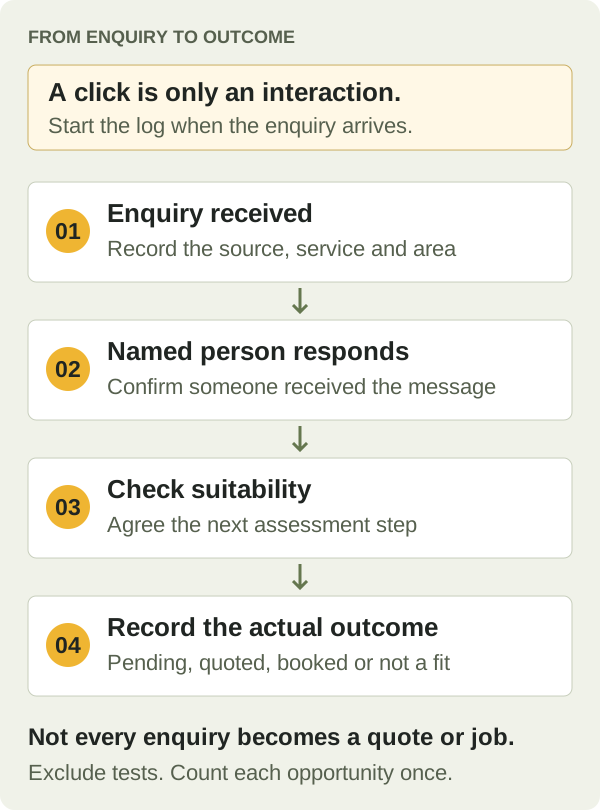
Record a private enquiry ID, date, source if known, requested service/area, first response and outcome. Distinguish a button click, an actual enquiry, a suitable opportunity, a quote and booked work. A click is not a lead, and a lead is not revenue.
Alex’s fictional form test is marked TEST, received and replied to, then excluded from business totals. A separate fictional enquiry progresses from receipt to response and a suitability conversation in worksheet 6. No bookings or revenue are claimed.
Ask “How did you hear about us?” when appropriate. Keep “unknown” as a valid answer. Customer memory and software attribution are both imperfect.
Set privacy up alongside the form
Use a privacy notice that describes what you actually collect, why, who receives it, how long you keep it and how people can contact you about it. Choose an appropriate lawful basis for your processing, limit staff/supplier access and decide a retention schedule. A quote enquiry does not automatically give permission for unrelated promotional messages. The ICO’s privacy-notice tool for small organisations is a practical starting point.
You can begin with a private enquiry log and Search Console without adding visitor analytics. Before installing analytics, advertising tags, embedded maps or similar tools, check what they store or access and the applicable rules. Do not assume “analytics” or “cookieless” means consent is unnecessary; current rules include specific exceptions with conditions. The narrow statistical purposes exception requires clear information and a simple, free way to object, alongside its other conditions. Check the purpose, provider settings and actual data use. Where consent is required, obtain it before the relevant tools operate. Follow the ICO’s current storage and access exceptions guidance for your actual setup. Never send customer names, phone numbers, email addresses or message text into analytics events or tracking URLs.
Done when a genuine test reaches the right person, receives a response and is excluded from your lead totals; privacy arrangements match the tools in use.
7. Check your launch
Use worksheet 5 and record the evidence, not just a tick. Check the site on a phone and a larger screen.
- Can you read the headings, open and close the menu, follow links and complete the form without layout problems?
- Do call and email links use the correct details?
- Does a test form reach the right inbox, with a usable reply route and clear error handling?
- Are services, coverage, availability and proof accurate?
- Are placeholder names, unsupported badges and fake testimonials absent?
- Are the privacy notice and applicable business details accessible?
For the search checks, ask your website provider to confirm that the intended public pages can be crawled and are not accidentally marked noindex, which asks search engines not to index them. The canonical URL, the preferred address declared for a page, should match the intended published version. Submit the sitemap in Search Console and inspect important URLs. These checks help identify access and discovery problems; they do not guarantee inclusion or rankings. Google’s SEO starter guide.
Link service pages from your home or services navigation, and give them a clear route to contact. A page should not depend on a sitemap alone for visitors to discover it.
Done when the site works publicly, enquiry tests pass and any search-access issues have a recorded next action. Keep unresolved verification or indexing separate from “website launched”.
8. Build real proof and local relationships
Ask customers for honest reviews
After real work, use a consistent request process that does not select only customers expected to leave positive feedback. Do not offer incentives for a review or for changing or removing one, request a particular rating or divert unhappy customers away from the public review option. Let customers describe their experience in their own words. Google’s fake-engagement policy.
Use the existing electrician review-request templates and adapt the real business name and usable review link. A customer is free not to review. Respect a refusal rather than repeatedly chasing them. Reply without disclosing private job or customer information.
Turn real work into a useful story
After a completed job, record the customer’s original problem, what you actually did, relevant constraints and the evidenced outcome. Obtain appropriate permission for words and photographs before publishing. A broad area is usually enough to explain coverage; a customer’s full address is rarely useful in a public marketing story.
The worksheet includes a job-story blank. Alex has no completed customer work in this scenario, so the completed example honestly records “not ready to publish”. Do not fill that gap with an invented success story.
Maintain a few worthwhile listings
Begin with profiles your business already qualifies for or pays for. Check each provider’s eligibility, costs, public-address handling, edit access and enquiry route. Do not display a trade-body affiliation solely because its directory looks valuable. Use our business listing guidance as a starting point and verify the provider’s current terms before signing up.
A genuine relationship with a local supplier, contractor or organisation can also create useful introductions. Offer relevant information or a real contribution. Avoid buying ranking links or joining bulk link-exchange schemes. Google identifies manipulative link schemes as spam. Google’s search spam policies.
Done when your next proof or listing task has an evidence source, permission/access check and owner. There is no required monthly review or link quota.
9. Decide whether you need more pages
First improve a weak service explanation or broken enquiry route. More pages will not repair either problem.
A separate area page should help a customer in that area make a decision. Ask: do we actually serve it, is there a distinct customer need, and can we add useful original information or evidence beyond swapping the place name?
Alex initially lists Haxby and Wigginton in the coverage information. The fictional business has no area-specific project evidence or separate service proposition, so there is no reason to manufacture duplicate town pages. Revisit the decision when actual enquiries or work reveal a useful distinction.
Google’s spam policies address doorway pages made to capture similar searches and funnel visitors onward. That is a reason to assess usefulness, not a claim that every location page is prohibited. Google’s doorway-abuse guidance.
Once core pages and response handling work, keep a note of questions customers repeatedly ask. Write a helpful answer when it warrants one. Link it to the related service. Do not publish a blog simply to satisfy a weekly quota, and avoid electrical DIY instructions that are outside the purpose of your marketing content.
Done when you can explain why a proposed page helps a customer more than improving an existing page would.
10. Diagnose problems and keep a monthly routine
“No enquiries” can describe several different problems. Check them in this order:
| Observation | Check next | Useful action |
|---|---|---|
| Website or form does not work | Phone/desktop test and delivery logs | Fix access or delivery first |
| Profile access/verification unresolved | The recorded Google status | Follow the correct ownership or verification step |
| Important website page not indexed | Search Console URL inspection | Investigate reported access, indexing or canonical issues |
| Pages indexed but little relevant exposure | Service clarity, coverage, search queries and competition | Improve the page that matches the actual customer need |
| Relevant visitors but few enquiries | Offer clarity, trust and contact journey | Test the page with someone unfamiliar with the business |
| Enquiries arrive but are unsuitable | Requested service, location and expectations | Clarify coverage or scope on the relevant page |
| Suitable enquiries do not become work | Response, quotation and outcome notes | Address the recorded business reason before adding traffic |
Search Console impressions are appearances in search results; clicks record clicks through from those results. A click does not confirm a completed visit or enquiry, and neither measure proves a booking. Keep those measures separate from profile interactions and your enquiry log. With small numbers, one job or missed call can change a percentage sharply. Record the underlying counts and avoid declaring a trend from a handful of observations.
Once a month, check access and renewals, public business details, a fresh contact test, unresolved profile/indexing issues, suitable enquiries and their outcomes. Add one useful improvement supported by what you found. Assign an owner and review date. Worksheet 8 makes that routine copyable.
For example, if Alex’s log records several out-of-area requests, the next task is to make coverage clearer and inspect the source of those requests. If it records no requests at all, Alex first confirms the form still works and then investigates visibility. Publishing ten town pages is not the automatic answer to either situation.
Your first setup is complete when: your business controls its accounts, customers can understand the work you offer, enquiries reach a named responder, and unresolved Google tasks have a legitimate next step. Continue building real proof as the business does real work.
If you want help with the website
You can use this guide and the worksheets independently. A new business may be best served by finishing a modest DIY setup first.
If you would prefer help building and maintaining the site, see TradeSites websites for electricians. Check whether the current service fits your stage and needs before choosing managed support. This guide does not promise that buying a package will produce particular rankings or leads.